Halo 1: Combat Evolved - I remember opening my christmas present and seeing this attached with my xbox, thinking that it was just another "we're trying to promote this game by giving it away free with the console" - game. Turns out it wasn't. Halo 1 was an entirely new gaming experience, giving us a vast world to run and explore while fighting off hordes of aliens threatening human existence. After being released in close-quarters combat as the only Spartan left, you are thrown down to a huge alien world in which you must fight your way further into the enemy stronghold.
You didn't stop here, however. Halo 1 also offered multiplayer. I remember complaining that it didn't have simulates like one of my favorite FPS games Perfect Dark®, but this didn't matter to anyone because "the graphics are so amazing!" Then came the discovery of the LAN party. This was by no means the first game to ever use LAN, but it was the first console game with those kinds of graphics that did. Staying up until unknown hours of the night, secluded in two different rooms in the house, with 2 T.V.s, 2 Xboxes, 8 remotes, a LAN cable that we drilled a hole in the wall for just so we could be in separate rooms, and a whole hell of a lot of screaming at one another. And it still continued.
The LAN games were just the beginning. By using the incredible edible internet (RvB reference here), users were able to download, much to the dismay of Xbox and the slowly developing "Xbox Live®," Xbox Connect, or XBC. XBC was used by those clever enough to scour the internet for it, and get it set up (relatively easy). This gave Halo 1 an incredible jump on every other game that was being released. XBC would soon support many other games besides Halo, but Halo still remains the most prominently used game.
Pistol kill after pistol kill, the game never, to this day, has never gotten boring. Kill or be killed, headshot after headshot, the winner was the one who had more gaming skill. Skill... something that apparently means little to those trying to make a good online FPS nowadays. Halo: Combat Evolved changed the gaming world and set a whole new book of standards for the hardcore and everyday gamers.
Halo 2 - The anticipation killed us, we woke up each day wishing it was November 9th, 2004. Xbox live was up and booming, and the game of many people's dreams was about to hit the market. Halo 2, the sequel to one of the most revolutionary games of the decade, is released in stunning numbers. 8.46 million copies sold as of today, a stunning number for an original Xbox game.
Halo 2 brought us the BR, and along with that, the BxR, BxB, double shot, quad shot, super bounce, and so many blue screeners that we didn't know what to do with ourselves. But we put up with the cheaters, the stand-byers, the host boosters, the circle boosters, the modders, and so many other atrocities, and we continued to play; play for that notorious colored number next to our names.
Before the first rank reset, the notorious number was 21, I got to a 21 and was so proud of myself because that took about 300 wins in a row, somehow without playing modders every other game. We worked so hard for that, memorizing levels, perfecting BxRs and quad shots, only to have our ranks erased. This was, of course, to erase the ranks of the cheaters as well, but none of us cared because the game was still fun.
The new reset came with an easier ranking system, one that was still impossible to legitimately reach the top, but much easier than the last one. We played our hearts out, both having fun and trying every game, only getting upset when you had to wait for that blue screen to go away and see your flag 20 feet from the enemy's score point.
But...we...stayed.... We took all the battering and cheating, and continued to play the game again and again, and until the servers were shut down, I continued to play the game; not just for the memories, not just for kicks and giggles, I went back and played the game (just like I still play Halo 1), for the love of the game.
Halo 3 - After being teased with the beta for a few weeks, people would have given their left lung to get an early copy of Halo 3. Finally, on 9/25/2007, the release of the 3rd game in a series of (so far) perfect games is released. I will not mention the campaign at this point, for we know that these games will continue to have excellent campaign missions. The difference here was with the change to the multiplayer. Halo 3 slowed down the combat a tiny bit, to allow for more equal play amongst players. This allowed the "n00bs" to have a better chance against the elite players. The BxRs and all those glitches were taken care of, the modders and stand-byers were banned and handled appropriately, and we could once again enjoy playing the game.
A new ranking system was introduced, one that let those who dominated show their skills as Generals and recruits were easily identified. The new system also allowed matchmaking to be a little more fair, where instead of completely random pairings for matches, players were typically matched up against other players near their skill range.
You may notice that the review becomes less in depth at this point, and it is to demonstrate what I am getting at here.
Halo: ODST - A game created on the side of the typical Halo series where, instead of playing as the Master Chief, you are an Orbital Drop Shock Trooper who must do his best to protect the city before help arrives. Many people did not enjoy the game, but I thought the campaign was very well formed, and it somewhat reminded me of Halo 1, where the covenant are tough SOBs and you have to watch your back because you can die fairly easily. The heath-pack system returned and the game became much more fun for anyone who likes a game where it's not just run and gun. The element of hiding before you attack, and coordinated cooperative attacks with friends on the big enemies makes the game much more enjoyable.
ODST, besides a very new campaign environment, brought us the firefight mode. Firefight pits you (and if you like, your friends) against an infinite amount of invading covenant forces. Struggling to make it to the end of a round, or having no ammo and being forced to sneak attack an elite in order to get his gun, are things that made Halo 1 so much fun. Although the firefight mode is limited, and you cannot usually play for too long without some friends backing you up, it is a great addition to the Halo series and should be credited as such.
Halo Reach - We'll get to this in a bit. I got one of the early beta codes and have been playing it for a few weeks now. After the initial hype went away for it, I began to realize something.
First, a brief recap.
Halo 1 - Perfect. We continue to play.
Halo 2 - Promised that it would be like Halo 1, but it dramatically changing the play of Halo 1, only keeping the basic element of kill or be killed. A game that, although there were many, many cheaters, we continued to play.
Halo 3 - Promised it would be more like Halo 1, but it didn't even come close. Although the game was made more "friendly" for those who weren't particularly good at it, it was nothing like Halo 1; we continued to play.
Halo ODST - Promised to give us more of a Halo 1 feel, which it did, but there was NO MULTIPLAYER besides firefight, which had nothing to do with playing against other people - the thing that made Halo 1 so spectacular. But.... we continued to play.
Halo Reach - Promised it would be more like Halo 1, the beta shows this isn't happening.
I have continued to play, and I have continued to expect you, Bungie, to recreate the game that got you where you are today, but you have not done so. I have waited and waited for you to realize that people who played the original Halo game are the ones who got your company where it is now, and that we have expected you to continue to give us a reason to purchase your games. You have not.
I am writing this message to tell you that you have failed to recreate the game that first got me interested, you have failed to create a game that lives up to even half of the original Halo 1's reputation, you have created games, not for the hardcore gamers who love to play them, but more for those who are discouraged by playing games that are too tough, or games that don't hold their hand while they play. The Halo games, as they are now, although they require skill to play, have been toned down and simplified, items and options added, and transformed into games that nearly anyone can pick up and play with the big boys.
I congratulate you for creating games that seem more appealing to those who don't enjoy losing just because they're worse than their opponents. The games you are creating aid those who aren't as skilled, giving them a much better chance of victory, thus making the game more enjoyable. The more enjoyable you make a game for people, the more people who will purchase it, I understand that and I am glad you strive for this. The problem is how you're making the game more fun, you're making it more fun by making it easier for the people who aren't good at the game.
I conclude with this:
Thank you for the creation of Halo 1, 2, and ODST. 3 and Reach have been steps too far, and with the newest release (Reach), you will be losing the interest of many people who have longed for a recreation of Halo 1: Combat Evolved.
I hope you receive this, and receive it well. Please inform me when you create the Halo 1 type of game that so many of us long for and have been promised will come.
Friday, May 14, 2010

Wednesday, March 17, 2010
Linux Photoshop
I have always delighted in giving myself projects with new programs, and one of my favorite things to use is Photoshop. I love exploring the infinite possibilities, and I like to slowly see myself get better and better with the tools that are given to me.
I took the (at the time) latest release of Puppy Linux from their website, and went to work. I boot from the live CD into a test computer, the typical computer that we receive from students (it is the recommended and supported school laptop). I ran through the live CD and found all the correct drivers and utilities that would be needed for us to easily work on the computers when they come in with problems that require us to use Puppy's safe environment. With Puppy fully functional and running exactly how we liked it to run, I needed to do something about the appearance. Puppy comes with a decent theme and background built in, but we wanted something unique for our I.T. Department.
This is where the Photoshopping comes into play.
I used a blank slate and began with a small idea on what I wanted to do. First, I knew that I wanted to incorporate the Puppy Linux puppy, and the word "Linux" in the photo. I quickly added "Linux" and curved it to my liking using the simple built in shapes tool. The next step was to add the puppy logo, but I wanted to make it look a little like a sphere, so I added a small amount of gradient inside an oval near the top of the logo, giving it that spherical look. I created a circle just outside of the logo, a little larger, then feathered it in order to created a sense of distance coming from the logo. I decided that just plain old Linux was too bland for the project, and created my own variation of the word. I strung a long eclipse from the 'I" to one half of the "X", and made it appear to be a ring. I set the ambience by blending a blue gradient into the background, and created a sense of infinity by hand drawing tons and tons of stars, all variations of sizes.
This is what I ended up with, and I am quite proud of the results.

Monday, March 8, 2010
EyeSaver.app

So I've been fooling around with Applescript for a while now, and I decided to give myself a little project. After a long day of sitting and staring at computer screens, my eyes aren't as happy as they were in the morning. When I get in my room and shut the lights off in order to just relax, the only thing that bothers me is the brightness of my screen. Of course, you might say, just turn the stupid brightness down. Well that would be a good idea but that doesn't mean that the white is gone, and it also reduces the focus of the screen, since the colors are getting closer to one another. I looked for a way to fix this problem, without causing the others, and it was quite simple; just invert the colors. With colors inverted, it is harder to view pictures and surf the internet, but I am not one to do that too often. Mainly, I sit on my computer, talk to friends on AIM (I don't MySpace or Facebook, I hate them). I also write my occasional program while sitting in my room.
Apple has a built in color inversion keyboard shortcut (Command + Option + Control + 8). I use this quite often now when I get home and my eyes need to relax but I am unable to get off the computer for either homework or etc. With the new Apples, however, they have a unique little feature that uses the ambient light sensors in the computer to auto-dim your display when the room gets darker. This function is great, and I wanted to write an applescript that utilizes that function with the needs of my own. I created an applescript that uses a C program to determine the current brightness of the display. The C program, as well as some others, is all thinks to Amit Singh, and can be viewed here. I revised the program a tiny bit, and instead of it printing the results to the screen, it writes them to a specific file.
The applescript I created first prompts the user whether the colors are currently inverted or not. It then creates a new folder in your /Library/Application Support/ folder called "EyeSaver." The C program saves a small txt file with the current brightness reading into that folder. The script then reads that value, and acts accordingly. The screen brightness is recorded as a value between 0 and 1, 1 being the brightest. If the screen brightness is below .5 (I have set that as default), then the applescript runs a quick "key code" command which inverts the colors for the user. It records whether or not the screen is inverted by reading a variable either as a 1 or a 0, then stores the new value in the variable if the colors were switched. The program is still in it's beginnings, and only either runs for a set number of seconds, or until you "sudo kill" it haha. I am looking to find a way so that the program can be running in the background or quit at any time.
The program takes up minimal CPU usage and barely any memory. I am confident that it works on a majority of Macs. Any questions or comments and I would be more than happy to reply.
Thursday, December 17, 2009
Geektool Desktop
I'm posting here to describe what I have recently done with a couple real simple scripts and some help with photoshop. I am a huge Assas
sin's Creed fan, and with the new one being released, I thought I should spice it up a little b
it.
Currently this is my desktop, using Geektool and a couple scripts I wrote real quick to change the configurations of the lettering.
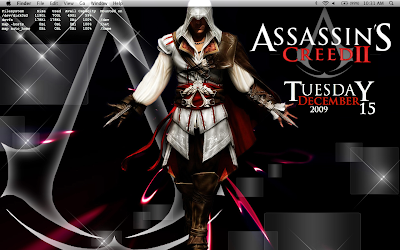
So, I found the Ezio image on Google images, and the background had a few stars in it, but I went along and Photoshopped the large, faded Assassin's logo somewhat behind Ezio and pulled the "Assassin's Creed II" closer to the center of the picture.
Now for the scripts which enabled me to mimic the font and positions of the words for the date. The simplest way to do this, is to just use Geektool to run some separate shell scripts.
date +%B <- Gives you the current month.
date +%A <- Gives you the current day.
date +%d <- Gives you the current day (number).
date +%Y <- Gives you the current year.
Then all you have to do is position the scripts, change the fonts and colors, and you're all set. They actually have a matching font built right in, it's called Trajan Pro (yes, yes, hehe, let's all get the giggles out first). The only problem with this is that, although it is the same font, it does not perfectly match the Assassin's Creed logo, and being the perfectionist that I am, I needed to find a quick and dirty way to get it to look as much like the logo as I could. This is where the scripts come in to play. If you are familiar with writing scripts, this should be fairly easy. If you are not, I am still fine-tuning them to make sure they work for every day, in every month, and still holds the perfect font we're looking for in our output. As soon as I am sure that the scripts work for everything, so long as you set the font and position correctly, I will post them.
For now, however, I will merely describe what they do, so all you people out there who know how to write scripts, can write your own, maybe you can come up with a better one than I have.
Originally, I was calling if statements, and in each one I was using grep to search for certain letters in the "date +%A" and then acting based on that. Now, I have realized that it is much more efficient to merely call "date +%A" once, and then do if statements for each of the 7 days of the week. Based on which day it is, I pull out all the letters except the first and last, and leave enough spaces in between to account for the missing letters. The script then outputs my results (the two letters with spaces in between) to the console. This is the first script. The second script uses the same method, but instead of removing the inside letters, it removes just the first and last letters of the day, and outputs that. Make sure that you save your scripts as .scpt and that they are in a location that you can remember and access easily later on.
Now that we have the scripts, we can run them using Geektool. Go into Geektool, and place a new "Shell" anywhere on your desktop. For the code that will be executed in the shell, type "osascript /The/Location\ of\ Your/Script_File.scpt". Now you have Geektool running the script file, set the interval which you would like it to update, and change the font to Trajan Pro, with the size and color you would like. Do the same thing for the other script, and you are good to go. Like I mentioned before, I have not made the scripts absolutely perfect yet, the spacing for particular days and months still is not exact, but as soon as I know that they are working perfectly, I will post them.
Tuesday, October 14, 2008
Fun to be One
 So it's official, well it has been for a while but now I have proof outside of the game itself, that I am the best in the world at Yaris. Yes, Yaris, that terrible free arcade game made by Toyota in order to promote their new line of cars. No matter how bad the game is, or even what it is about, how often can someone say that they are the best in the entire world at something? I think it's pretty cool.
Pub Games

Friday, October 10, 2008
Damn You Dell
It's 5:30, I want to go home, a girl comes by to pick up her laptop that has already had its motherboard replaced (by me around 2:30), but it is still not working. The only people left in the tech room are me and Dave. The girl arrives but the motherboard wasn't the problem. Between the 4 brains working on the laptop earlier, we could not figure out why the LCD wasn't displaying anything, or allowing us to transfer the image to another screen. By now I had tried all combinations of 3 different LCD screens, and two motherboards, still not working. Dave, being new, and the girl watch patiently while I begin replacing anything and everything that may be effecting the LCD.

I tried the RAM, the HD, the LCD (3 different ones), the motherboard
(2 different ones), the keyboard, the modem, the WLAN, the heat sync, the processor, the speaker, the fan, and the DVD ROM drive, but the computer refused to display anything on the LCD screen.
6:30 and I have run out of options. I am surrounded by computer parts, none of which have made this computer work. The girl was very patient which helped, but here's a picture of what I had been doing. Note that this is only one of the 3 tables I was using for the repairs, and of course, my Mac is on top.
Here's the Tech Room Carnage

Subscribe to:
Posts (Atom)